Content creators often balance filming, editing, sound, and storage in one workspace. A useful Christmas gift can support a specific part of that routine, whether the recipient makes videos, podcasts, product photos, or visual designs.
13 Gifts for Content Creators
1. UGREEN DXP2800 2-Bay NAS Enclosure
For Growing Media Libraries
UGREEN DXP2800 2-Bay NAS Enclosure

- Centralizes photos, 4K videos, backups, and other files across devices.
- Supports up to 80TB using two HDD bays and two M.2 NVMe slots.
- Diskless enclosure; HDDs and SSDs are sold separately.
Best For: Creators with several devices and growing project archives.
2. TONOR Peel-and-Stick Acoustic Panels, 12 Pack
For a Clearer Recording Space
TONOR Peel-and-Stick Acoustic Panels, 12 Pack

- High-density polyester fiber panels are designed to absorb and diffuse sound.
- Peel-and-stick backing applies to smooth walls without nails or power tools.
- The 12-panel set covers approximately 46.5 square feet.
Best For: Creators recording voice or video in an echo-prone room.
3. DUCLUS 32-Inch Photography Light Box
For Small-Product Shoots
DUCLUS 32-Inch Photography Light Box

- Includes 210 LEDs with adjustable brightness and three movable light panels.
- Front and top openings support different shooting angles.
- Six matte backdrops provide a choice of background colors.
Best For: Creators photographing products, handmade items, or collectibles.
4. FLEXISPOT EN1 Electric Standing Desk
For a More Flexible Workspace
FLEXISPOT EN1 Electric Standing Desk
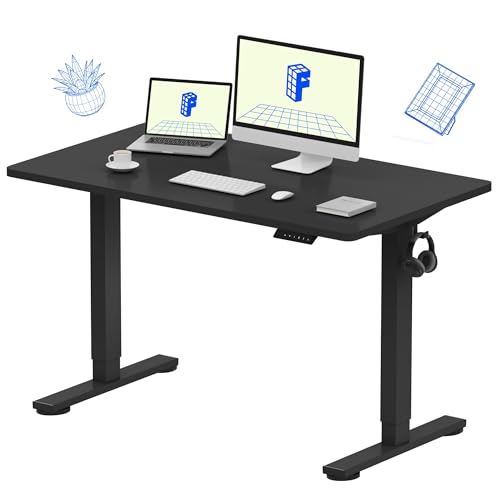
- Electric height adjustment supports sitting or standing, with four memory presets.
- The 48-by-24-inch seamless desktop provides space for monitors and accessories.
- Supports up to 176 pounds, according to the supplied product details.
Best For: Creators who spend long sessions writing, designing, or editing at a desk.
5. COMAN FF16LS Heavy-Duty Video Tripod
For Smooth Camera Moves
COMAN FF16LS Heavy-Duty Video Tripod

- Fluid head pans 360 degrees and tilts from -75 to +90 degrees.
- Aluminum tripod supports a maximum load of 22 pounds.
- Quick-release plate and foldable L-bracket are included.
Best For: Creators filming tutorials, talking-head videos, or steady B-roll.
6. EUCOS 62-Inch Phone Tripod with Remote
For Phone-First Filming
EUCOS 62-Inch Phone Tripod with Remote

- Extends from a compact tripod into a 62-inch selfie stick.
- Wireless remote supports capture from up to 33 feet away.
- Built-in cold shoe provides a mount for accessories such as lights or microphones.
Best For: Creators filming short videos or self-recording with a compatible phone.
7. Datacolor Spyder Monitor Calibrator
8. NEEWER Overhead Camera Mount Rig
For Top-Down Tutorials
NEEWER Overhead Camera Mount Rig

- Desk clamp rig adjusts in height and width for overhead shooting setups.
- Two ball heads swivel 360 degrees for flexible camera or phone angles.
- Includes a phone holder; crossarms and additional mounting accessories are sold separately.
Best For: Creators filming cooking, crafts, unboxings, or desk demonstrations.
9. Canon EOS R50 Camera Kit with 18–45mm Lens
For a Camera-Centered Upgrade
Canon EOS R50 Camera Kit with 18–45mm Lens
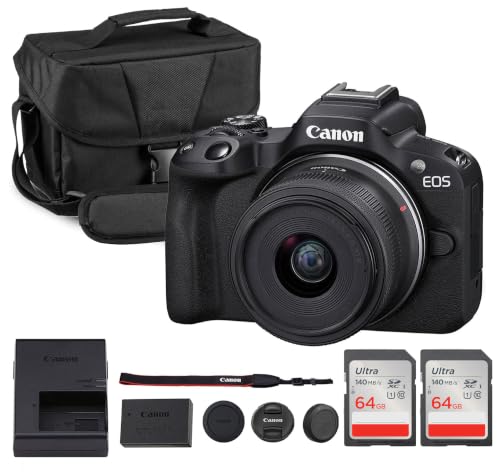
- Mirrorless camera kit includes an 18–45mm zoom lens, shoulder bag, and two 64GB cards.
- Records 4K video and offers vertical video support for social content.
- Dual Pixel autofocus includes face and eye detection.
Best For: Newer creators who want one camera for video, portraits, and travel.
10. VSD N4 Pro Stream Controller
For Repeatable Desktop Workflows

- Configurable LCD keys, RGB knobs, and a touch bar can trigger shortcuts and macros.
- Supports scene presets for streaming, editing, gaming, and office use.
- USB-C design is listed as compatible with Windows 10+ and macOS 11.0+.
Best For: Streamers and editors who repeat computer actions during production.
11. EMART Two-Piece Softbox Lighting Kit
For Softer Indoor Light
EMART Two-Piece Softbox Lighting Kit

- Includes two 16-by-16-inch softboxes, LED bulbs, light stands, and a carry bag.
- Bulbs support app or remote control for brightness and 3000K–6000K color temperature.
- The kit is described for portrait, product, recording, and livestream lighting.
Best For: Creators filming or photographing indoors who want adjustable fill light.
12. Logitech Blue Yeti USB Microphone
For Desk-Based Audio
Logitech Blue Yeti USB Microphone

- USB microphone offers cardioid, omni, bidirectional, and stereo pickup patterns.
- Onboard controls include headphone volume, mute, pattern selection, and mic gain.
- Works with Mac or PC and includes a desktop stand.
Best For: Podcasters, streamers, and video creators recording at a computer.
13. ASUS ProArt 27-Inch 4K OLED Monitor
For a Color-Focused Editing Desk
ASUS ProArt 27-Inch 4K OLED Monitor

- 26.5-inch 4K QD-OLED display lists 100% sRGB and 99% DCI-P3 coverage.
- USB-C supports up to 96W Power Delivery; HDMI, DisplayPort, and a USB hub are also listed.
- Stand supports tilt, swivel, pivot, and height adjustments.
Best For: Creators editing photos, video, or design work at a desk.
Choosing a Christmas Gift for a Content Creator
Start with the work the recipient already does. A creator who records voiceovers or podcasts may appreciate a USB microphone or acoustic panels; someone who films overhead craft or cooking demos may get more use from the desk-mounted rig. Product photographers have more targeted choices in the light box and softbox kit. For a frequent editor, consider the monitor, color calibrator, or standing desk. These gifts solve different problems, so match the tool to a visible part of the recipient’s routine rather than assuming every creator needs a camera.
Think about the space as well as the format. A large light box or pair of softboxes needs room to set up and store. Acoustic panels need suitable smooth wall space. A tripod needs a stable place to open its legs, while the overhead rig is designed to clamp to a desk. A NAS can centralize a growing media library, but it is a more involved gift because compatible storage drives are purchased separately and the recipient will need to configure it.
Set a Budget That Fits the Upgrade
Small accessories and workflow tools can make useful gifts without requiring a complete studio renovation. A phone tripod, stream controller, or monitor calibrator suits a focused improvement. Larger workspace and camera purchases are substantial commitments; for those, consider whether the creator has mentioned a specific need or existing setup. A practical gift does not have to be the most expensive item. It should remove a recurring obstacle, such as inconsistent lighting, awkward framing, or time spent repeating the same computer steps.
Check Compatibility and Personalization
Before choosing camera or desk gear, look at the recipient’s existing devices and room. The Canon kit uses a Canon RF mount, and the phone tripod’s clamp is described for phones 2.2 to 3.6 inches wide. The USB microphone is listed for Mac and PC, while the stream controller specifies Windows 10 or later and macOS 11.0 or later. Confirm that those match the recipient’s computer and workflow.
Personalize the choice around their content. A creator who photographs reflective jewelry may value a controlled light-box setup; someone who films demonstrations from above may prefer a mount that frees both hands. For color work, a calibrator and a color-focused monitor address related but distinct needs: one calibrates a display, while the other provides an editing screen with listed color coverage. For the NAS, check drive needs and the space available for a dedicated storage device. For acoustic panels, consider the wall finish and room layout before gifting a kit that requires installation.
Timing and Last-Minute Decisions
For a Christmas gift, leave enough time to check the exact model and fit against the recipient’s setup. Larger equipment may call for a conversation about space, ports, camera mount, or storage requirements. If that would spoil the surprise, choose a gift tied to a clear, known routine, such as desk recording or phone filming. Keep the product details handy so the recipient can confirm compatibility when they open it.
When time is short, prioritize a defined use case and straightforward fit. A phone tripod for someone who regularly records on a phone is easier to match than a camera system for an unknown lens setup. A USB microphone or controller still needs a compatible computer, so check that first if possible. For a larger or more specialized item, a printed note explaining why it fits their work can make the choice feel personal while leaving room to confirm the setup. Christmas gifting works best when the present supports the creator’s own style and makes a familiar task more comfortable or repeatable.